Your Sales & Marketing Dashboard

Your Sales & Marketing Dashboard is where all of your prospects live along with email campaigns, automations, lists and forms.

When you first login you’ll see some snapshots with a menu on the left-hand side. This is your main menu where you will be able to navigate to anything you’re looking for.
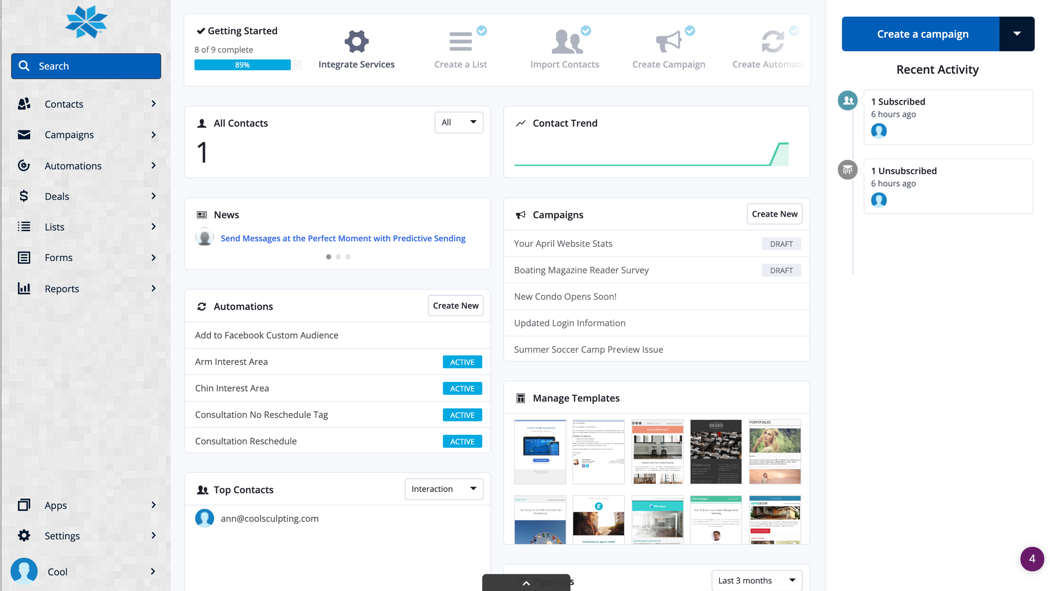
Here’s what you can find in each menu item:

Contacts
  • Find contact records for everyone in your system.
  • Add tags or view current tags using the sub menu once in Contacts.
Campaigns
  • This is where you will go to send a one-off email to a list or group that has specific conditions met.
Automations
  • Most of the work in here is done by us. This is where we set up sequences/actions/emails to run automatically in the background based off of certain criteria being met.
Deals
  • Your Sales Pipeline lives in here. You’ll want to visit this page to work with that.
Lists
  • Here you can create new lists or learn more about those already created. This is how we group people based on interests or reasons they would be receiving communication from you.
Forms
  • This is where we create forms to use on your website for opt ins, events, etc.
Reports
  • This is where you can find reports on the campaigns you’ve sent, automations that are running and the contacts in your database.